- Mājas lapa /
- Elektronika /
- Television & Video /
- Televīzijas piederumi /
- Remote Controls /
- Repair Membrane for Logitech Harmony Remote 6...
0 ratings


Preces #:
40543004
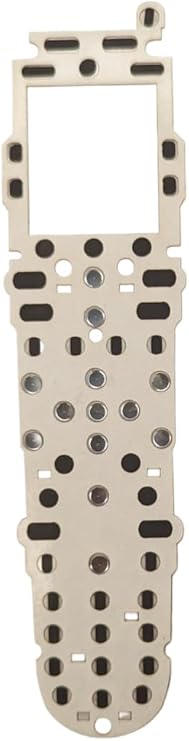
Repair Membrane for Logitech Harmony Remote 600 650 665 700
Preces #:
40543004
€ 34
Price Details
Excluding Shipping & Custom charges ( Shipping and custom charges will be calculated on checkout )
*All items will import from ASV
0 ratings
Uzrakstīt atsauksmi
Noliktavā
 Importēts no veikala USA
Pasūtiet tūlīt un saņemiet to Monday, Jūlijs 27
Secured transaction
Ubuy works hard to protect your security and privacy. Our advanced payment security system ensures confidentiality by encrypting your information during transmission using AES (Advanced Encryption Standards) and SSL (Secure Socket Layer) protocols. Your payment details are 100% secure as we do not share your payment details with third party sellers.
Our Top Logistics Partners


ButtonWorx is the only button repair that can last, Tested over 1 million button presses!

Fast
Shipping

Free
Return*

Secure Packaging

100% Original Products

PCI DSS Compliance

ISO 27001 Certified


Note: Step Down Voltage Transformer required for using electronics products of ASV store (110-120). Recommended power converters Pērc tagad.


What Stands Out
Precision Fit
Designed specifically for Logitech Harmony Remote models 600, 650, 665, and 700, ensuring a perfect fit that restores functionality and enhances user experience while prolonging the remote's lifespan.
Easy Installation
User-friendly installation process allows for quick replacement without the need for professional assistance, making it accessible for anyone to restore their remote quickly and efficiently.
Durable Quality
High-quality materials ensure long-lasting durability, resisting wear and tear while providing a reliable solution that protects devices and enhances usability for everyday remote control functions.
Produkta informācija
- Easy Put-In-Place installation with disassembling and cleaning required
- Installation video(s) available for reference
- Tested over 1 million button presses for durability
- Repairs worn out rubber contact buttons
- Metal dome keys (directional, channel, and volume) can be cleaned instead of repaired
- ButtonWorx pad replaces the original keypad to complete the switch
| Package Weight | 1 Pound |
Who Should Buy?

-
DIY Enthusiasts
Individuals who enjoy repairing their devices will appreciate the ease of use and cost-effectiveness of this product.
-
Harmony Remote Users
Users of models 600, 650, 665, and 700 will find this replacement membrane perfect for restoring functionality.
-
Budget-Conscious Consumers
People looking to save money on replacing their remotes will benefit from this affordable repair option.

-
Non-Technical Users
Individuals with limited technical skills may struggle to install the repair membrane successfully on their remote.
-
New Remote Buyers
Those considering purchasing a new remote may find this repair membrane unnecessary and not worth the effort.
-
Older Remote Models
Users with older or unsupported models will not find compatibility with this repair membrane designed for specific models.
PRODUKTA APRAKSTS
Repair Membrane for Logitech Harmony Remote 600 650 665 700
About This Item
Introducing the ButtonWorx Repair Membrane for Logitech Harmony Remote Models 600, 650, 665, and 700! Are you tired of dealing with worn-out buttons on your Logitech Harmony remote? Look no further, because we have the perfect solution for you. The ButtonWorx Repair Membrane is designed specifically for Logitech Harmony remotes, providing a quick and easy fix for unresponsive or worn-out buttons. Compatible with a wide range of Logitech Harmony remote models, including the popular Logitech Harmony 650, 665, and 700, this replacement membrane ensures that your remote stays in perfect working condition. With its easy installation process, you don't need any professional help to fix your remote.
Simply remove the old membrane and replace it with the ButtonWorx Repair Membrane. It's as easy as that! Not only will this replacement membrane restore the functionality of your Logitech Harmony remote, but it will also enhance its durability. Made with high-quality materials, the ButtonWorx Repair Membrane is built to last, ensuring that you can continue enjoying seamless control over your devices for years to come. Investing in the ButtonWorx Repair Membrane means saving yourself the hassle and expense of purchasing a brand new remote.
You'll be amazed at how a simple replacement can bring new life to your Logitech Harmony remote. Don't let worn-out buttons ruin your remote control experience. Upgrade your Logitech Harmony remote with the ButtonWorx Repair Membrane today and say goodbye to unresponsive buttons. Order now and regain full control over your devices!.
Vai jums ir kādi jautājumi? Terzet ar mums
Klientu jautājumi un atbildes
-
jautājums:
What is a repair membrane for Logitech Harmony remotes?
atbildi: A repair membrane is a thin, flexible layer designed to restore the functionality of the buttons on Logitech Harmony Remote models 600, 650, 665, and 700. This membrane acts as a bridge between the control panel and circuit board, ensuring that each button press is registered accurately. Over time, the original membrane can wear out due to extensive use, leading to unresponsive buttons. Replacing the membrane can revitalize your remote, making it fully operational again, which is essential for a seamless home entertainment experience. -
jautājums:
How do I know if my Logitech Harmony remote needs a new repair membrane?
atbildi: Signs that your Harmony remote might need a new repair membrane include buttons that do not respond when pressed, inconsistent functionality, or buttons that require multiple presses to register. If you've checked that the batteries are functioning properly and the issue persists, it is likely due to a deteriorated membrane. In such cases, replacing the membrane can restore the original functionality, allowing you to easily control your devices without frustration. -
jautājums:
Can I install the repair membrane myself?
atbildi: Yes, installing a repair membrane for your Logitech Harmony remote is a DIY-friendly task. The process generally involves disassembling the remote, carefully removing the old membrane, and placing the new one in its position. Many users find step-by-step instructional videos online to guide them through the process. With a little patience and careful handling, you can successfully replace the membrane, saving costs on professional repairs and extending the lifespan of your remote. -
jautājums:
What tools do I need to replace the repair membrane?
atbildi: To replace the repair membrane of your Logitech Harmony remote, you'll typically need a few basic tools: a small Phillips screwdriver to open the remote casing, a pair of tweezers to handle the components delicately, and possibly a plastic spudger to help pry the casing open without damage. Having a clean, well-lit workspace will also make the task easier, ensuring you can manage small parts effectively during the repair process. -
jautājums:
Will replacing the repair membrane affect the functionality of my remote?
atbildi: No, replacing the repair membrane should enhance the functionality of your remote. If installed correctly, the new membrane will allow your buttons to respond as they did when the remote was new. This restoration is vital, especially for models like the Logitech Harmony 600, 650, 665, and 700, where repeated use may degrade button sensitivity. Therefore, a successful installation can significantly improve your user experience and overall satisfaction with your remote. -
jautājums:
Where can I buy a repair membrane for Logitech Harmony Remote models 600, 650, 665, 700?
atbildi: You can buy a repair membrane for Logitech Harmony Remote models 600, 650, 665, and 700 from Ubuy. Ubuy provides a convenient online shopping platform where you can easily find spare parts for your electronics, including high-quality repair membranes tailored for your specific remote model. This ensures you receive components that meet the necessary specifications for a seamless installation and restoration of your remote's functions. -
jautājums:
How much does a repair membrane cost on average?
atbildi: While I cannot provide specific price ranges, repair membranes for Logitech Harmony remotes are generally budget-friendly. The cost typically varies based on factors like store pricing policies and availability. However, investing in a new membrane is often significantly less expensive than purchasing a brand-new remote. This cost-effectiveness makes it an appealing option for maintaining your home entertainment system without breaking the bank. -
jautājums:
Are there any compatibility issues with the repair membrane?
atbildi: When purchasing a repair membrane, ensure that it is specified for Logitech Harmony Remote models 600, 650, 665, and 700. Compatibility should not be an issue if the membrane is designed for your exact model, given that these remotes share similar internal layouts. However, avoid using membranes from unrelated models, as they may not provide the correct fit or functionality, leading to further issues. -
jautājums:
How long does it take to replace the repair membrane?
atbildi: Replacing the repair membrane on your Logitech Harmony remote can typically be completed in 30 minutes to an hour, depending on your experience level with such repairs. Factors like familiarity with electronics repair and the tools at hand can speed up the process. However, take your time to ensure each step is done carefully, as rushing can lead to mistakes that may damage the remote or the new membrane. -
jautājums:
Can a repair membrane fix all button issues on my remote?
atbildi: While a repair membrane can resolve most button-related issues caused by wear and tear, it may not fix problems stemming from other components, such as the circuit board or battery connections. If the buttons still do not work after a membrane replacement, it may be worth investigating further into the internal components. Proper diagnosis can help you identify whether a membrane replacement alone will suffice or if further repairs are necessary.
buttonworx Remote Controls Editorial Review
The Logitech Harmony Button Repair kit is a great solution for those experiencing issues with their Logitech remote control buttons. This kit is easy to install and does not require any particular skills, making it suitable for anyone who can follow simple instructions. The buttons are now more responsive and firmer after the upgrade. This repair kit fixes conductive sheet issues that restore buttons to work like new. Watching the video on YouTube is highly recommended to install the kit correctly. One may need to be patient when placing the buttons since they are tiny, but the effort is worth it. The repair will outlast the remote. However, some customers mention that the hardest part of the repair is opening and reassembling the remote. Thus, it is important to follow the instructions provided in the video.
Customer Reviews & Ratings
1 klientu vērtējumi
-
5 zvaigzne
100%
-
4 zvaigzne
0%
-
3 zvaigzne
0%
-
2 zvaigzne
0%
-
1 zvaigzne
0%
Pārskatiet šo produktu
Dalieties savās domās ar citiem klientiem
Pros
- Easy installation
- Makes buttons more responsive
- Saves money and avoids purchasing a new remote
- Highly recommended to watch YouTube video
Mīnusi
- Some customers experienced difficulty opening and reassembling remote
Platform Trust & Buyer Confidence

MT
Mohd
Verified buyer
“The product received very good packaging & safe…Thank You”
16 June 2026 · via Trustpilot
SJ
Shawati
Verified buyer
“Accurate delivery timing given”
16 June 2026 · via Trustpilot
YB
Youcef
Verified buyer
“Not madly expensive like I thought, and much quicker than promised.”
15 June 2026 · via Trustpilot
LM
Leila
Verified buyer
“Never dealt with Ubuy before, but everything worked out great. Seamless cross border purchasing and shipping. Thanks!”
6/7/2026 · via Trustpilot
KA
Kwame
Verified buyer
“The process was smooth, with clear communication and timelines. This was my 1st purchase and I am really impressed. I will definitely be coming back.”
12 June 2026 · via Trustpilot
Droša izrakstīšanās
Global Delivery
Easy Returns
Genuine Products
Product Price History
Svarīga informācija
- Ierobežojumi: attiecībā uz produktiem, kas tiek nosūtīti starptautiski, lūdzu, ņemiet vērā, ka jebkura ražotāja garantija var nebūt derīga; ražotāja servisa iespējas var nebūt pieejamas; produktu rokasgrāmatas, instrukcijas un drošības brīdinājumi var nebūt galamērķa valsts valodās; produkti (un pavadošie materiāli) var nebūt izstrādāti saskaņā ar galamērķa valsts standartiem, specifikācijām un marķēšanas prasībām; un produkti var neatbilst galamērķa valsts spriegumam un citiem elektriskajiem standartiem (ja nepieciešams, nepieciešams adapteris vai pārveidotājs). Par to, lai produktu varētu likumīgi ievest galamērķa valstī, ir atbildīgs saņēmējs. Pasūtot no Ubuy vai tā saistītajiem uzņēmumiem, saņēmējs ir ierakstu importētājs, un viņam jāievēro visi galamērķa valsts tiesību akti un noteikumi.
- Ne visi Ubuy uzskaitītie produkti ir pārdošanā, jo Ubuy ir globāla meklētājprogramma. Uz produktiem attiecas eksporta/tirdzniecības noteikumi.
€ 34
Pasūtiet tūlīt un saņemiet to Monday, Jūlijs 27
This item is not restrict in my country.(Please click on above link if this item is not restrict in your country, So our team will review and allow.)
QTY:
Secured transaction
PCI DSS compliant and ISO 27001:2022 certified, with encrypted payments and full buyer protection on every order.
Our Top Logistics Partners
Fastest cross-border delivery
Funkcijas un priekšrocības
- ButtonWorx membrane repair kit lasts long
- 2023 updated with easy Put-In-Place installation
- Needs disassembling and cleaning the device for installation
- Repairs all worn out rubber contact buttons
- Directional, channel and volume keys can only be cleaned
- Comes with 2mm thick acrylic light pipe plastic for placement
Ubuy Assurance
Experience worry-free shopping with 100% original products, PCI DSS-compliant payment security, ISO 27001-certified data protection, the fastest cross-border delivery, free returns *, and secure packaging on every order.