- Mājas lapa /
- Elektronika /
- Computer Accessories /
- Computer Accessories & Peripherals /
- Keyboards, Mice & Accessories /
- Logitech MX Master 4 for Mac Ergonomic Wirele...
0 ratings


Preces #:
219397183
Logitech MX Master 4 for Mac Ergonomic Wireless Bluetooth Mouse with Haptic Feedback + MX Keys S for Mac Wireless Bluetooth Keyboard with Backlit Low
Preces #:
219397183
€ 286
Price Details
Excluding Shipping & Custom charges ( Shipping and custom charges will be calculated on checkout )
*All items will import from ASV
0 ratings
Uzrakstīt atsauksmi
Noliktavā
 Importēts no veikala USA
Secured transaction
Ubuy works hard to protect your security and privacy. Our advanced payment security system ensures confidentiality by encrypting your information during transmission using AES (Advanced Encryption Standards) and SSL (Secure Socket Layer) protocols. Your payment details are 100% secure as we do not share your payment details with third party sellers.
Our Top Logistics Partners


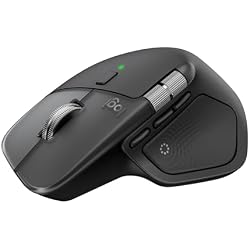
Mastered for Mac: With matching Apple finishes, Logi Options+ functions for macOS, MX Master 4 for Mac makes for a perfect fit with your Apple setup.
Šajā komplektā ir 2 vienumi

Fast
Shipping

Free
Return*

Secure Packaging

100% Original Products

PCI DSS Compliance

ISO 27001 Certified



Note: Step Down Voltage Transformer required for using electronics products of ASV store (110-120). Recommended power converters Pērc tagad.


What Stands Out
Ergonomic Design
The MX Master 4 offers exceptional comfort during extended use, reducing strain on your wrist and hand, making it perfect for long work sessions.
Haptic Feedback
This mouse features advanced haptic feedback, providing tactile responsiveness for enhanced precision and an immersive user experience, perfect for creative tasks.
Wireless Convenience
Both the mouse and keyboard connect seamlessly via Bluetooth, eliminating clutter and allowing for a tidy workspace, while also supporting multiple devices for flexibility.
Produkta informācija
- Mastered for Mac: With matching Apple finishes, Logi Options+ functions for macOS (1), USB-C charging while you work (cable not included), MX Master 4 for Mac makes for a perfect fit with your Apple setup
- Precision you can feel with the Haptic Sense Panel; customizable (1) haptic feedback on specific actions, shortcuts, notifications enhancing productivity on this wireless Bluetooth mouse
- Effortlessly access favorite tools with Actions Ring (2) on this MX Series mouse—a dynamic, customizable overlay adapts to each app, placing most used filters, adjustments, and shortcuts at your cursor
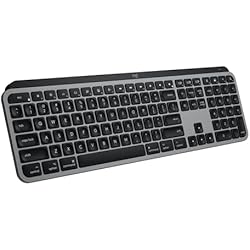
- Mastered for Mac: With a Mac key layout and matching Apple finishes, Logi Options plus functions for macOS (1), USB C charging, Logitech MX Keys S for Mac makes for a perfect fit with your Apple setup
- Fluid Typing Experience: A laptop-like profile with spherically dished keys shaped for your fingertips; experience fast, fluid, and precise typing on this wireless bluetooth keyboard for Mac
- Automate Repetitive Tasks with Logitech Keyboard: Easily create and share time-saving Smart Actions shortcuts to perform multiple actions with a single keystroke with the Logi Options plus app (1)
| Connectivity Technology | Bluetooth |
| Other Special Features of the Product | Haptic Feedback, Backlit Keys, Customizable Shortcuts |
| Compatible Devices | Laptop, Tablet |
| Keyboard Layout | QWERTY |
| Minimum Required Operating System Version | Mac OS 10.15 Catalina |
| Operating System | Mac OS |
| Color | Space Black |
| Brand | Logitech |
| Keyboard Description | Wireless Bluetooth Keyboard with Backlit Low Profile Keys |
| Unit Count | 1 Count |
| Special Feature | Haptic Feedback, Backlit Keys, Customizable Shortcuts |
| Item Weight | 1.6 lbs (730 grams) |
Who Should Buy?

-
Creative Professionals
Graphic designers and video editors can leverage precision controls and customizable buttons for enhanced productivity and workflow.
-
Frequent Travelers
Compact design and wireless functionality make this combo ideal for users who work on-the-go or in various locations.
-
Writers and Programmers
Backlit keys and ergonomic design offer comfort and visibility, making long typing sessions less fatiguing.

-
Budget Users
Those looking for affordable peripherals may find this premium-priced combo beyond their financial reach.
PRODUKTA APRAKSTS
Vai jums ir kādi jautājumi? Terzet ar mums
Klientu jautājumi un atbildes
-
jautājums:
Kā iepirkties Logitech MX Master 4 for Mac Ergonomic Wireless tiešsaistē no Ubuy?
atbildi: Ir viegli iepirkties Logitech MX Master 4 for Mac Ergonomic Wireless tiešsaistē no Ubuy.. Jums vienkārši ir jāmeklē prece, izrakstīšanās laikā jāizvēlas piegādes veids un jāsaņem tā piegāde uz jūsu atrašanās vietu. -
jautājums:
Vai Logitech MX Master 4 for Mac Ergonomic Wireless ir pieejams iepirkšanās tiešsaistē šeit: Latvia?
atbildi: Jā, Ubuy Latvia šis produkts ir pieejams, lai jūs varētu iepirkties par saprātīgu cenu.. Logitech MX Master 4 for Mac Ergonomic Wireless nav pieejams lokāli, taču varat mums uzticēt mūsu ātrās piegādes pakalpojumus. -
jautājums:
Cik ilgs laiks nepieciešams, lai saņemtu preci pēc pasūtījuma veikšanas?
atbildi: Jūsu pasūtītās preces piegādes laiks atšķiras atkarībā no jūsu pasūtījuma un jūsu izvēlētā piegādes veida.. Paredzamais piegādes laiks tiek minēts norēķināšanās procesā, tāpēc iepērkoties esiet bezrūpīgs.
Logitech Keyboards, Mice & Accessories Editorial Review
The Logitech MX Master 4 for Mac is garnering praise across the board for its exceptional ergonomic design, advanced features, and high-quality performance. Users frequently highlight the mouse's comfort during prolonged use, with many noting a significant reduction in hand strain, which is often a concern for those spending extensive hours at their desks. The ergonomic shape, combined with improvements in texture and button placement, enhances comfort and usability even further. Performance-wise, the MX Master 4 stands out in terms of precision and responsiveness. The smooth scrolling, accurate tracking, and the addition of customizable buttons have been warmly received, allowing users to tailor the mouse to their workflow. Its seamless integration with software applications, especially creative tools like Photoshop and Premiere, has been particularly highlighted, as it enhances productivity through features like the Actions Ring. Battery life is Consistently mentioned as another strong point, with users reporting that they rarely, if ever, need to recharge the mouse. The Bluetooth connection is stable, allowing for smooth transitions between multiple devices, which many users find invaluable in their multi-device work environments. Despite being priced above average, many customers feel that the MX Master 4 is worth the investment due to its durability, advanced features, and the quality of life improvements it brings to daily tasks. Overall, this mouse seems to have solidified itself as a top choice for professionals seeking an efficient and comfortable input device. **
Customer Reviews & Ratings
1 klientu vērtējumi
-
5 zvaigzne
0%
-
4 zvaigzne
100%
-
3 zvaigzne
0%
-
2 zvaigzne
0%
-
1 zvaigzne
0%
Pārskatiet šo produktu
Dalieties savās domās ar citiem klientiem
Pros
- Exceptional ergonomic design reduces hand strain
- Precise tracking and smooth scrolling
- Customizable buttons enhance productivity
- Excellent battery life with infrequent recharges
- Strong Bluetooth connection across multiple devices
- Seamless software integration boosts workflow efficiency
Mīnusi
- Higher price point compared to other mice
Product Price History
Svarīga informācija
- Ierobežojumi: attiecībā uz produktiem, kas tiek nosūtīti starptautiski, lūdzu, ņemiet vērā, ka jebkura ražotāja garantija var nebūt derīga; ražotāja servisa iespējas var nebūt pieejamas; produktu rokasgrāmatas, instrukcijas un drošības brīdinājumi var nebūt galamērķa valsts valodās; produkti (un pavadošie materiāli) var nebūt izstrādāti saskaņā ar galamērķa valsts standartiem, specifikācijām un marķēšanas prasībām; un produkti var neatbilst galamērķa valsts spriegumam un citiem elektriskajiem standartiem (ja nepieciešams, nepieciešams adapteris vai pārveidotājs). Par to, lai produktu varētu likumīgi ievest galamērķa valstī, ir atbildīgs saņēmējs. Pasūtot no Ubuy vai tā saistītajiem uzņēmumiem, saņēmējs ir ierakstu importētājs, un viņam jāievēro visi galamērķa valsts tiesību akti un noteikumi.
- Ne visi Ubuy uzskaitītie produkti ir pārdošanā, jo Ubuy ir globāla meklētājprogramma. Uz produktiem attiecas eksporta/tirdzniecības noteikumi.
€ 286
Pasūtiet tūlīt un saņemiet to Ceturtdiena, Septembris 03
This item is not restrict in my country.(Please click on above link if this item is not restrict in your country, So our team will review and allow.)
QTY:
Krājumā palikušas tikai 3 preces.
Secured transaction
PCI DSS compliant and ISO 27001:2022 certified, with encrypted payments and full buyer protection on every order.
Our Top Logistics Partners
Fastest cross-border delivery
Funkcijas un priekšrocības
- Designed specifically for Mac with a seamless aesthetic.
- Customizable haptic feedback enhances productivity.
- Access favorite tools through the dynamic Actions Ring.
- Fluid typing experience with a laptop-like profile and unique key design.
- Automate tasks with Smart Actions shortcuts for efficiency.
- USB-C charging allows convenience while you work.
Ubuy Assurance
Experience worry-free shopping with 100% original products, PCI DSS-compliant payment security, ISO 27001-certified data protection, the fastest cross-border delivery, free returns *, and secure packaging on every order.