- Mājas lapa /
- Elektronika /
- Computer Accessories /
- Computer Accessories & Peripherals /
- Input Devices /
- Graphics Tablets /
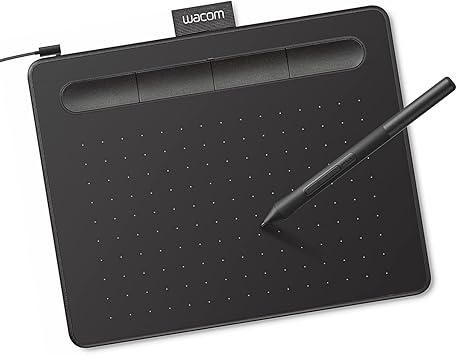
- Wacom Intuos Small, Wired Graphic Drawing Tab...
0 ratings




Preces #:
220835228
Wacom Intuos Small, Wired Graphic Drawing Tablet with Pen + Software | Battery-free pen, 4 ExpressKeys for shortcuts, works with Mac, Windows &
Preces #:
220835228
€ 50
Price Details
Excluding Shipping & Custom charges ( Shipping and custom charges will be calculated on checkout )
*All items will import from ASV
0 ratings
Uzrakstīt atsauksmi
3K+ bought
Noliktavā
 Importēts no veikala USA
QTY:
Pasūtiet tūlīt un saņemiet to Sestdiena, Augusts 22
Secured transaction
Ubuy works hard to protect your security and privacy. Our advanced payment security system ensures confidentiality by encrypting your information during transmission using AES (Advanced Encryption Standards) and SSL (Secure Socket Layer) protocols. Your payment details are 100% secure as we do not share your payment details with third party sellers.
Our Top Logistics Partners


Transform the world by bringing your vision to life with a Wacom pen in your hand.

Fast
Shipping

Free
Return*

Secure Packaging

100% Original Products

PCI DSS Compliance

ISO 27001 Certified



Note: Step Down Voltage Transformer required for using electronics products of ASV store (110-120). Recommended power converters Pērc tagad.


What Stands Out
Versatile Compatibility
Works seamlessly across multiple platforms including Chromebook, Mac, Android, and Windows, providing flexibility for artists and designers to use their preferred devices.
Customizable ExpressKeys
Four programmable ExpressKeys offer personalized shortcuts, enhancing workflow efficiency by allowing users to access their favorite functions instantly while drawing.
Included Training & Software
Comes with comprehensive training resources and software, enabling beginners to quickly master the tablet's features and enhance their artistic skills right out of the box.
Produkta informācija
| Brand | Wacom |
| Model Name | Intuos Small |
| Built-In Media | Wacom Intuos Small Tablet, Wacom Pen 4k, USB-A cable with L-shaped Connector, 3 extra standard nibs and nb removal tool, Quick start guide, regulation sheet |
| Target Audience | Teacher |
| Model Number | CTL4100 |
| Global Trade Identification Number | 00753218986887 |
| Number of Items | 1 |
| Manufacturer | Wacom Technology Corporation |
| UPC | 753218986887 |
| Unit Count | 1 Count |
| Number of Packs | 1 |
| External Testing Certification | Não aplicavel |
| Item Type Name | Wacom Intuos Small, Without Bluetooth, black |
| Mfr Part Number | CTL4100 |
| Connectivity Technology | USB-A |
| Pressure Sensitivity | 4096 levels |
| Operating System | Works with Windows, Mac OS, Android |
| Additional Features | Plug-and-play with Chromebook |
| Specific Uses For Product | Designing, Digital Art, Photo Editing |
| Compatible Devices | Windows 7, 8.1 or 10 (excluding Windows 10 S; latest service pack/build), macOS 10.11 or later (latest update) |
| Display Type | Other |
| Screen Size | 7 inches (17.8 cm) |
| Item Weight | 8.1 ounces (229.64 grams) |
| Item Dimensions L x W | 6.3"L x 7.87"W (16 cm) |
| Active Surface Area | 6" x 3.7" |
| Color | Black |
| EU Spare Part Availability Duration | 7 years |
| Special Feature | Plug-and-play with Chromebook |
Bīstamās kravas
Lai izvairītos no aizkavēšanās bīstamo kravu muitošanas procesā, sūtījums tiek atvērts mūsu noliktavas telpā, lai pārbaudītu bīstamo sastāvdaļu smagumu. Please see the list of Dangerous goods here.
What's in the box
Wacom Intuos Small Tablet, Wacom Pen 4k, USB-A cable with L-shaped Connector, 3 extra standard nibs and nb removal tool, Quick start guide, regulation sheet
Who Should Buy?

-
Beginner Artists
Ideal for novice artists looking to start digital art without overwhelming features or complicated setups.
-
Students & Educators
Great for students and teachers needing a versatile tool for assignments, presentations, or digital teaching resources.
-
Mobile Creatives
Perfect for on-the-go creatives needing a compact, lightweight drawing solution compatible with multiple devices.

-
Professional Illustrators
May lack advanced features preferred by professional artists for intricate designs and robust performance needs.
PRODUKTA APRAKSTS
Vai jums ir kādi jautājumi? Terzet ar mums
Klientu jautājumi un atbildes
-
jautājums:
Kā iepirkties Wacom Intuos Small, Wired Graphic Drawing Tablet tiešsaistē no Ubuy?
atbildi: Ir viegli iepirkties Wacom Intuos Small, Wired Graphic Drawing Tablet tiešsaistē no Ubuy.. Jums vienkārši ir jāmeklē prece, izrakstīšanās laikā jāizvēlas piegādes veids un jāsaņem tā piegāde uz jūsu atrašanās vietu. -
jautājums:
Vai Wacom Intuos Small, Wired Graphic Drawing Tablet ir pieejams iepirkšanās tiešsaistē šeit: Latvia?
atbildi: Jā, Ubuy Latvia šis produkts ir pieejams, lai jūs varētu iepirkties par saprātīgu cenu.. Wacom Intuos Small, Wired Graphic Drawing Tablet nav pieejams lokāli, taču varat mums uzticēt mūsu ātrās piegādes pakalpojumus. -
jautājums:
Cik ilgs laiks nepieciešams, lai saņemtu preci pēc pasūtījuma veikšanas?
atbildi: Jūsu pasūtītās preces piegādes laiks atšķiras atkarībā no jūsu pasūtījuma un jūsu izvēlētā piegādes veida.. Paredzamais piegādes laiks tiek minēts norēķināšanās procesā, tāpēc iepērkoties esiet bezrūpīgs.
Wacom Graphics Tablets CTL4100 Editorial Review


The Wacom Intuos Small Graphics Drawing Tablet garners a generally positive reception among users, particularly those in educational settings and casual artwork. Many users appreciate the high-quality build and performance, noting that it effectively enhances their study and tutoring experience. Students have found it especially useful for note-taking, as it allows for a seamless digital writing experience without the need for bulky devices like iPads. The tablet's responsiveness and comfort are highlighted as major positives; however, some users have reported that using it via Bluetooth can lead to decreased responsiveness and some jagged lines, which may be bothersome for those who require finer precision. In contrast, when connected via cable, users have found it to perform smoothly and reliably. The customizable ExpressKeys are also a benefit, offering flexibility for personal workflows. While users find the tablet easy to use, a few have noted that extended use can lead to discomfort, specifically pointing out that after long writing sessions, the stylus can leave marks on fingers. Additionally, initial adaptation may be required due to the hand-eye coordination involved in using the tablet, as users may need time to adjust to writing without directly looking at their hand. An aspect that has drawn criticism is the Bluetooth functionality; some users experienced difficulties in switching connections between devices, which they found cumbersome. Despite these issues, most users felt that the tablet's strengths outweighed its weaknesses, and they would recommend it to others, particularly students or casual users. **
Customer Reviews & Ratings
23866 klientu vērtējumi
-
5 zvaigzne
76%
-
4 zvaigzne
14%
-
3 zvaigzne
5%
-
2 zvaigzne
2%
-
1 zvaigzne
3%
Pārskatiet šo produktu
Dalieties savās domās ar citiem klientiem
Pros
- High-quality performance for note-taking and casual drawing
- Comfortable to use with a smooth writing experience when wired
- Customizable ExpressKeys enhance workflow efficiency
- Ideal for educational purposes
Mīnusi
- Extended use may cause discomfort in fingers
Product Price History
Svarīga informācija
- Ierobežojumi: attiecībā uz produktiem, kas tiek nosūtīti starptautiski, lūdzu, ņemiet vērā, ka jebkura ražotāja garantija var nebūt derīga; ražotāja servisa iespējas var nebūt pieejamas; produktu rokasgrāmatas, instrukcijas un drošības brīdinājumi var nebūt galamērķa valsts valodās; produkti (un pavadošie materiāli) var nebūt izstrādāti saskaņā ar galamērķa valsts standartiem, specifikācijām un marķēšanas prasībām; un produkti var neatbilst galamērķa valsts spriegumam un citiem elektriskajiem standartiem (ja nepieciešams, nepieciešams adapteris vai pārveidotājs). Par to, lai produktu varētu likumīgi ievest galamērķa valstī, ir atbildīgs saņēmējs. Pasūtot no Ubuy vai tā saistītajiem uzņēmumiem, saņēmējs ir ierakstu importētājs, un viņam jāievēro visi galamērķa valsts tiesību akti un noteikumi.
- Ne visi Ubuy uzskaitītie produkti ir pārdošanā, jo Ubuy ir globāla meklētājprogramma. Uz produktiem attiecas eksporta/tirdzniecības noteikumi.
€ 50
Pasūtiet tūlīt un saņemiet to Sestdiena, Augusts 22
This item is not restrict in my country.(Please click on above link if this item is not restrict in your country, So our team will review and allow.)
QTY:
Secured transaction
PCI DSS compliant and ISO 27001:2022 certified, with encrypted payments and full buyer protection on every order.
Our Top Logistics Partners
Fastest cross-border delivery
Funkcijas un priekšrocības
- Ideal for beginners in drawing, painting, and photo editing.
- Compatible with Mac, PC, Chromebook, and select Android devices.
- Includes useful software and online tutorials for creative guidance.
- Perfect for educational settings to enhance learning and flexibility.
- Features a compact design, making it portable and space-efficient.
- Customizable ExpressKeys for personalized workflow.
Ubuy Assurance
Experience worry-free shopping with 100% original products, PCI DSS-compliant payment security, ISO 27001-certified data protection, the fastest cross-border delivery, free returns *, and secure packaging on every order.